

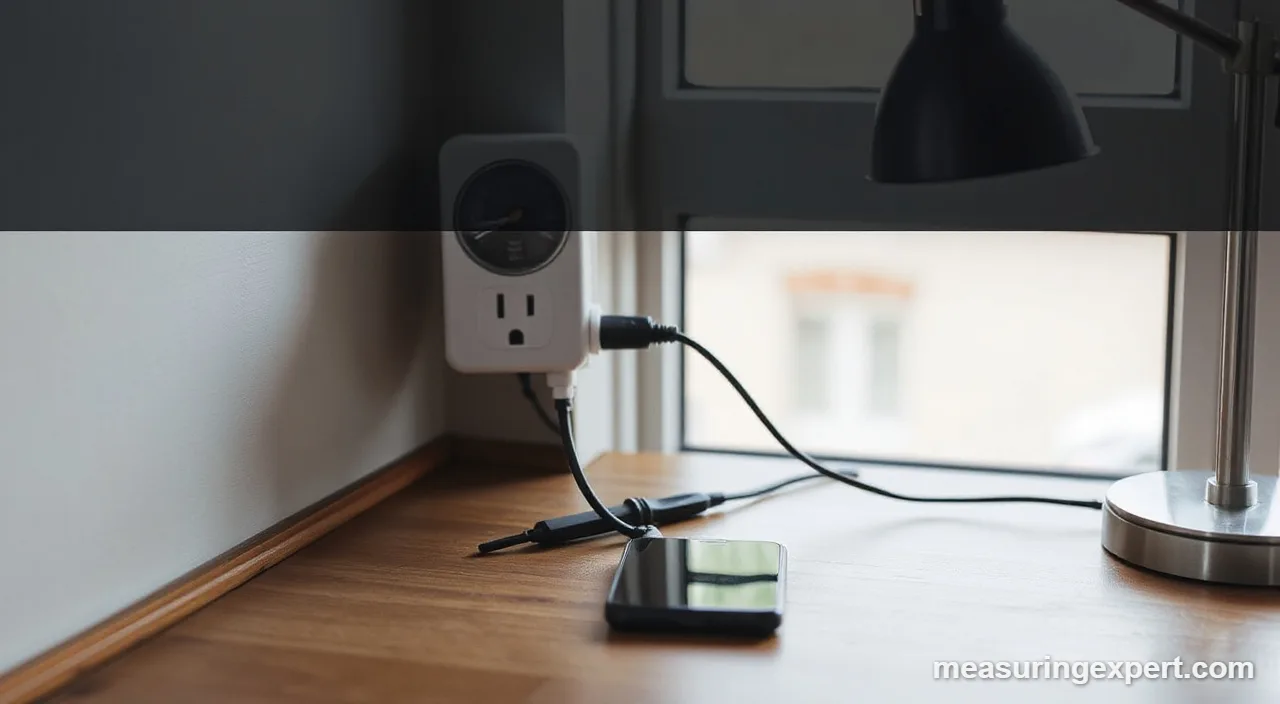
The best plug-in watt meter for most homes is the Kill A Watt P4400, because it shows watts, kWh, volts, amps, hertz and power factor on one large screen. Your goal decides the rest: pick a smart plug or strip when you want app history, or a two-outlet meter when you compare two devices.
In short: choose the Kill A Watt P4400 for a classic meter, the Poniie PN2000 for extra readings, and the Kasa HS300 when you want to watch many devices in an app.
As an Amazon Associate, Measuring Expert earns from qualifying purchases. Our picks are based on research, specifications and owner feedback, not paid placement.
Best Overall

Best Extra Readings
Best Smart
Quick Answer: Which Pick Fits Your Needs?
- Most homes: the Kill A Watt P4400, with kWh, watts, volts, amps, hertz and VA.
- Data that survives an unplug: the Kill A Watt EZ P4460 with its built-in battery backup.
- Small standby loads: the Poniie PN2000, with a 0.01 W display step.
- Two devices at once: the Briidea two-outlet monitor.
- Many devices in an app: the Kasa HS300 power strip.
- Zigbee or Home Assistant logging: the THIRDREALITY Gen3 plug.
- Not on the list: whole-home energy monitors, which clip onto the breaker panel instead of plugging in.
On This Page
- Comparison table
- The 6 picks, reviewed
- How we chose
- Best plug-in watt meter types
- Specs that matter
- How to measure appliance energy
- Accuracy and care
- Honest limits
- FAQ
- Bottom line
Best Plug-In Watt Meter Comparison at a Glance
| # | Product | Best For | Standout Feature | Amazon |
|---|---|---|---|---|
| 1 | P3 Kill A Watt P4400 Electricity Usage Monitor | Classic, trusted appliance testing | kWh, V, A, W, Hz, VA on one LCD | View |
| 2 | P3 Kill A Watt EZ P4460 Electricity Usage Monitor | Quick tests with a built-in battery backup | Eight readouts and battery backup | View |
| 3 | Poniie PN2000 Plug-In Watt Meter | Detailed readings at low and high loads | 0.01 W resolution and a 99,999 kWh counter | View |
| 4 | Briidea Electricity Usage Monitor (2 Outlets) | Comparing two appliances without swapping | Two outlets with elapsed Wh mode | View |
| 5 | Kasa Smart Wi-Fi Power Strip HS300 | Watching many devices from an app | Six outlets with per-outlet energy view | View |
| 6 | THIRDREALITY Zigbee Smart Plug Gen3 (Power Meter) | Smart-home users with a Zigbee hub | Factory-calibrated to plus or minus 1% | View |
The 6 Best Plug-In Watt Meter Picks, Reviewed
A plug-in watt meter sits between the wall outlet and an appliance and shows how much power the appliance draws. This list covers three bench-style meters, a two-outlet meter and two smart options that log data over time. In contrast, we left out whole-home monitors, which work at the breaker panel. For other electrical checks, see our best digital voltmeter guide.
Best Overall
1. P3 Kill A Watt P4400 Electricity Usage Monitor
Best for: anyone who wants a no-app meter that tells you what a plugged-in appliance really draws.
The Kill A Watt P4400 is the meter that gave this product type its name, and it is still the reference point for every alternative below. First, you plug it into the wall, plug the appliance into it, and read the display. According to the P3 International product page, the unit shows kilowatt-hours, volts, amps, watts, hertz and volt-amperes.
It also tracks power quality. For example, the maker lists line voltage, line frequency and power factor, and it states an accuracy of 0.2%. Moreover, the cumulative kWh counter lets you leave a refrigerator or a space heater on the meter for a day or a week and then read the total.
- Operating voltage: 115 VAC (maximum 125 VAC)
- Maximum current: 15 A, maximum power 1875 VA
- Stated accuracy: 0.2%
- Display: large LCD with kWh, V, A, W, Hz and VA
- Size and weight: 5 1/8 by 2 3/8 by 1 5/8 in., 5 oz.
Pros
- Complete set of readings, including power factor
- Cumulative kWh counter for long tests
- No Wi-Fi, app or account needed
- Stated accuracy is clear and specific
Cons
- The product page does not mention power outage memory
- Small buttons and a single screen mean cycling through readings
- Sits flush on one outlet and can block the neighbor
Skip it if: you want to log many devices over weeks or see the data on a phone; a smart plug does that better.
Best Easy Read
2. P3 Kill A Watt EZ P4460 Electricity Usage Monitor

Best for: people who want the Kill A Watt approach but a simpler layout and data that survives an unplug.
The P4460 EZ keeps the same core job as the P4400: plug in an appliance and read what it uses. In addition, the maker describes a large LCD that counts energy in kilowatt-hours, the same unit your utility bills. Also, it displays eight units of measure and calculates cost and forecasts by week, month and year.
However, the feature that sets it apart is the built-in battery backup, which the P3 page lists as a feature. Therefore, you can move the meter to another outlet without losing the running total. Also, its stated accuracy is within 0.2%, and the ratings match the P4400 at 115 VAC, 15 A and 1875 VA.
- Operating voltage: 115 VAC (maximum 125 VAC)
- Maximum current: 15 A, maximum power 1875 VA
- Stated accuracy: within 0.2%
- Display: large LCD, eight units of measure, energy in kWh
- Size and weight: 5 1/8 by 2 1/2 by 1 1/2 in., 5 oz.
Pros
- Battery backup keeps data when unplugged
- Same 15 A rating and 0.2% stated accuracy as the P4400
- Cost and forecast display by week, month and year
- Simple to learn
Cons
- The page does not state the battery type or life
- Same single-outlet design as the P4400
- The product page does not list the eight units by name
Skip it if: you only need a one-off reading; the P4400 does the same job with fewer extras.
Best for Extra Readings
3. Poniie PN2000 Plug-In Watt Meter
Best for: buyers who want fine resolution for small standby loads and a long list of measurements.
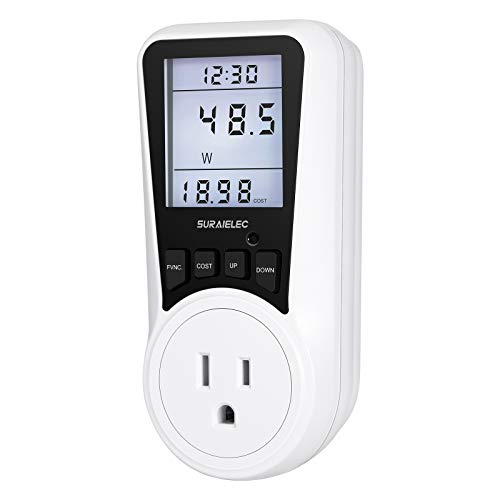
The Poniie PN2000 is a Kill A Watt alternative that leans on resolution. The PN2000 manual lists watts from 0.20 W, a display step of 0.01 W, and true RMS voltage and current. That helps, for example, when you check a charger or set-top box in standby.
It also reports frequency, power factor, cumulative time and energy. In addition, the energy counter runs to 99,999 kWh, and the manual says data is stored automatically and survives long power outages through a hold-over circuit. However, the manual sets the default overload alarm at 1800 W and warns against exceeding 1840 W at 115 V, while one retailer listing gives 1,760 W as the maximum. So check the rating printed on your unit.
- Voltage measurement range: 110.0 to 260.0 V; current 1.000 to 16.000 A
- Power: up to 1840 W at 115 V, per the manual
- Accuracy: Meter Class 1.0
- Energy counter: 0.00 to 99,999 kWh; time counter 0 to 99,999 minutes
- Operating temperature: 0 to 45 C (32 to 113 F)
Pros
- Fine 0.01 W resolution suits standby tests
- Data is kept through outages
- Reports frequency and power factor
- Overload alarm with a backlight warning
Cons
- Class 1.0 is a looser accuracy statement than the 0.2% of the Kill A Watt
- The backlight turns off after 10 seconds unless you change the setting
- Retail and manual maximum ratings differ
Skip it if: you want the tightest stated accuracy; the Kill A Watt models quote 0.2%.
Best for Two Devices
4. Briidea Electricity Usage Monitor (2 Outlets)
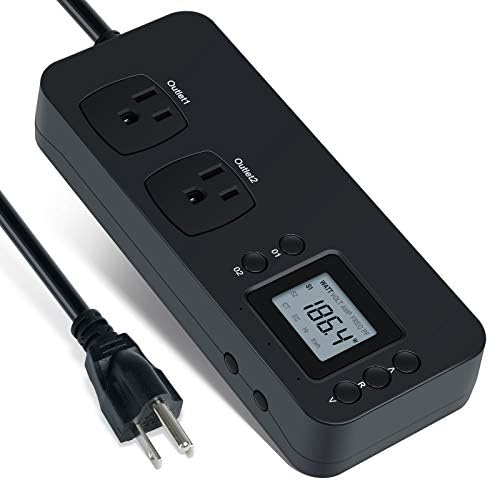
Best for: shoppers who want to watch a pair of devices, such as a TV and a game console, on one meter.
The Briidea monitor puts two outlets on one unit. According to the retailer listing we read, it displays watts, volts and amps, has an elapsed watt-hour mode, and keeps its data during a power-off. Also, it is rated 120 V with an overload warning at 1200 W. As a result, it suits small loads such as electronics and lamps better than a space heater.
The listing also calls the sensor high-precision but gives no numeric accuracy. In addition, some buyers report that the screen has no backlight and that kWh shows one decimal place, which makes small loads harder to judge. Because the maker data is thin, compare its readings against a meter with a stated accuracy.
- Rated voltage: 120 V
- Overload warning: 1200 W
- Outlets: two, readings for each device
- Modes: watts, volts, amps, power factor and elapsed Wh, per the listing
- Memory: retains data after power-off, per the listing
Pros
- Two outlets let you compare appliances
- Keeps data after power-off
- Overload warning at 1200 W
Cons
- No numeric accuracy is stated
- Buyers report a small, non-backlit display
- Lower power ceiling than the 15 A meters
Skip it if: you plan to meter a heater, a microwave or any load near 1,800 W.
Best Smart Strip
5. Kasa Smart Wi-Fi Power Strip HS300
Best for: people who want to see which device on a shelf or desk uses the most, without moving a meter around.
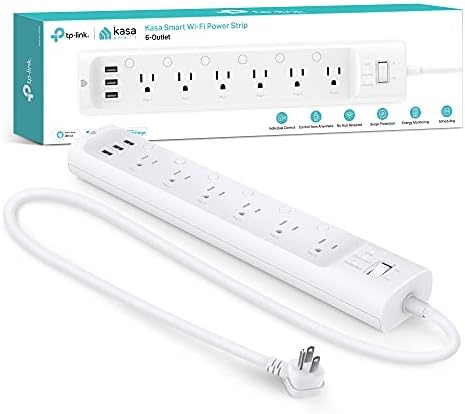
The HS300 is a power strip that doubles as a monitor. The Kasa product page says it shows how much energy each connected device consumes, viewable per outlet in the Kasa Smart app. Therefore, a desk with a monitor, a dock and a lamp can be tracked in one place.
However, it is not a bench meter. Also, the page does not list which metrics the app shows, and the strip has no display of its own. You do get six individually controlled outlets, a 15 A, 1875 W total load, three USB ports and built-in surge protection. Finally, Wi-Fi is 2.4 GHz only, and the strip needs a secured home network.
- Outlets: six, each independently controllable
- Load: 15 A and 1875 W maximum in total
- Surge protection: ETL certified, 500 V protection rating, Type 3 SPD
- USB: three ports at 5 V and 2.4 A each, 4 A total
- Wi-Fi: 802.11b/g/n on 2.4 GHz
Pros
- Tracks several devices at the same time
- Per-outlet schedules and control
- Needs no hub
- Built-in surge protection
Cons
- No on-device screen
- The page does not name the metrics or accuracy
- Requires the app and Wi-Fi
Skip it if: you want a quick reading with no phone and no account; a Kill A Watt is faster.
Best for Home Assistant
6. THIRDREALITY Zigbee Smart Plug Gen3 (Power Meter)
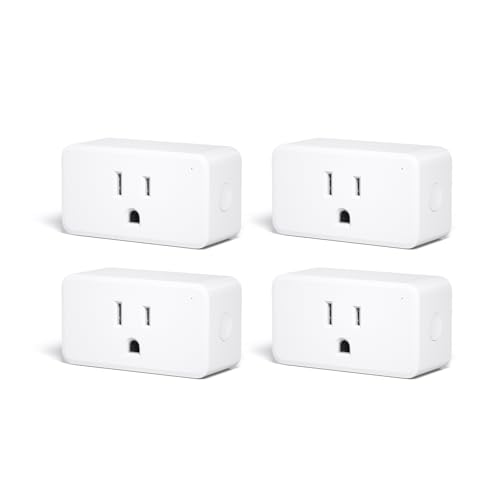
Best for: hobbyists who already run a Zigbee hub or Home Assistant and want power data on a dashboard.
The THIRDREALITY Gen3 plug is a small Zigbee device that reports power in watts and energy in watt-hours. The maker page states a measurement accuracy of plus or minus 1%, with each plug individually calibrated at the factory. A Metering Only mode keeps the relay on, so the plug will not switch an appliance off by accident while you log its use.
However, there is one big condition. The plug needs a compatible Zigbee 3.0 hub or coordinator, and the display lives in your hub software, such as Home Assistant. Consequently, it is a long-term logging tool, not a quick bench meter.
- Maximum current: 15 A, with no wattage rating given on the page
- Reports: power (W) and energy (Wh), shown by your platform
- Accuracy: plus or minus 1%, factory calibrated
- Connectivity: Zigbee 3.0, built-in repeater, hub required
- Certification: ETL
Pros
- Stated and calibrated accuracy
- Metering Only mode protects against accidental shutoff
- Good for long-term logging in Home Assistant
Cons
- Cannot be used without a Zigbee hub
- No display on the plug
- The page gives no dimensions or wattage rating
Skip it if: you do not own a Zigbee hub or want a reading in 30 seconds.
How We Chose the Best Plug-In Watt Meter Picks
To be clear, we did not test these meters by hand. Instead, we compared manufacturer pages and manuals, then kept complete plug-in units that fit a US 15 A outlet. As a result, every number in the reviews comes from those documents, and we left out any spec we could not find.
- Measurement set: at least watts and cumulative energy, ideally volts, amps, frequency and power factor.
- Stated ratings: a published voltage, current and power limit for a standard outlet.
- Accuracy statement: a numeric figure or class, where the maker gave one.
- Brand mix: no more than two picks per maker, and no plug-in unit that only switches power without measuring it.
- Background: for the energy formula we followed a Virginia Tech Cooperative Extension guide on estimating appliance energy use.
Best Plug-In Watt Meter Types: Bench Meter, Smart Plug or Whole-Home Monitor
Three product families get mixed up in search results, and each answers a different question. A bench meter gives an instant reading on a built-in screen. Meanwhile, a smart plug or strip sends readings to an app. Finally, a whole-home monitor measures the entire panel.
| Type | Where you read it | Best for | Examples here |
|---|---|---|---|
| Bench plug-in meter | Built-in LCD | Fast tests of one appliance | Kill A Watt P4400, P4460, Poniie PN2000, Briidea |
| Smart plug or strip | Phone app or hub software | Long-term logging of several devices | Kasa HS300, THIRDREALITY Gen3 |
| Whole-home monitor | App, wired to the breaker panel | Total house use | None; not a plug-in meter |
The bench meter wins on speed because it needs no setup. Smart options win on history, since they can record days or months without you standing next to the appliance.
Specs That Matter Most When You Compare Meters
Power limits and units
First, start with the electrical limit. Every plug-in meter in this guide is built for a 15 A, 120 V outlet, which equals 1,800 W of real power or 1,875 VA of apparent power at 125 V. Common wiring practice limits continuous loads to 80% of a circuit rating, so a sustained load is better kept near 12 A, or about 1,440 W at 120 V. Because of that, a meter rated for 1,200 W, like the Briidea overload warning, is a poor match for a heater.
Next, understand the units. Watts (W) measure real power at this moment. In contrast, volt-amperes (VA) measure apparent power, which is volts times amps. With simple heaters, the two match. For motors and power supplies, however, current and voltage drift out of step, and the ratio of W to VA is the power factor. For example, the P4400 reports VA and power factor, which lets you see that gap.
Energy math and resolution
Third, look at energy. Kilowatt-hours (kWh) equal kilowatts times hours, so a 100 W device running for 10 hours uses 1 kWh. Utilities bill in kWh, so this is the number to track. Then the table below shows what common standby and active loads add up to in a year, computed as watts times 24 hours times 365 days, divided by 1,000.
| Constant load | Per day | Per year |
|---|---|---|
| 2 W (small charger or adapter) | 0.048 kWh | 17.5 kWh |
| 10 W (set-top box or router) | 0.24 kWh | 87.6 kWh |
| 60 W (older fridge average) | 1.44 kWh | 525.6 kWh |
| 150 W (desktop PC under load) | 3.6 kWh | 1,314 kWh |
Finally, check resolution and accuracy. A meter with a 0.01 W step, like the Poniie PN2000, can distinguish a 0.5 W load from a 1 W load. Also, read each accuracy statement as a maker claim, not as something we verified.
How to Use a Plug-In Watt Meter to Measure Appliance Energy
The steps below work with any bench meter in this guide.
- Check the rating. Make sure the appliance draws less than the meter limit, usually 15 A or 1,800 W. If the label lists only watts, divide by 120 to estimate amps.
- Plug in the meter. Put it into the wall outlet first, then plug the appliance into the meter. Keep the appliance switched off until it is connected.
- Reset the counter. Clear the kWh and time totals, so that you start from zero.
- Run the normal cycle. Use the appliance as you usually do, for example a full wash cycle or a day with a refrigerator. Note the watts at the start, mid-cycle and at idle.
- Read the total. Record the kWh and the elapsed time, then compute daily use. Multiply by the days of use per year and by your utility rate per kWh.
- Test standby separately. Switch the appliance off with its own button and read the watts again. Many devices keep drawing power, so they still use energy while they look off.
For example, the calculator above shows that a 16 ohm resistive heater on 120 V draws 7.5 A and 900 W. Similarly, you can check whether a label rating fits within a 15 A meter. For more on voltage units, see our guide to the voltage symbol and unit.
Accuracy and Care Tips
A plug-in meter is simple, but a few habits keep readings trustworthy. First, let the load settle. Many devices spike at start-up, so read the average after a minute or two. Second, avoid daisy-chaining through extension cords, which may not match the meter rating. Third, keep the unit dry and within its temperature range, such as the 0 to 45 C (32 to 113 F) in the Poniie manual.
You can also cross-check a meter against a known resistive load, such as a heater with a labeled wattage. However, a small difference is normal. For live-circuit checks, our best electric circuit tester guide covers the right tools.
Limits of the Best Plug-In Watt Meter Picks
First, these meters read one outlet at a time. Also, they do not see lighting circuits, hard-wired appliances or 240 V loads. In addition, we did not test them, and the specs here come from maker pages, manuals and listings. Moreover, some listings differ from manuals, as with the Poniie maximum power. If an appliance trips a breaker, if a plug feels hot or if you suspect a wiring fault, stop and call a licensed professional. For multimeter-style checks of circuits, read our best auto-ranging digital multimeter guide.
Best Plug-In Watt Meter FAQ
What is the best plug-in watt meter for home use?
For most homes, the Kill A Watt P4400 is the best plug-in watt meter to start with. In addition, it shows kWh, watts, volts, amps, hertz and VA, and P3 states an accuracy of 0.2%. If you want app history, a smart plug or strip is a better fit.
Is a Kill A Watt the only choice?
In short, Kill A Watt is a brand name from P3 International. Also, a plug-in watt meter is the general product type, and the Poniie PN2000 and Briidea monitor are alternatives that work the same way.
How do I read kWh on a plug-in watt meter?
Reset the counter, run the appliance for a known time, then read the kWh total. Next, divide by the hours to get average kW. Finally, multiply the kWh by your utility rate per kWh to estimate cost.
Can a plug-in watt meter measure standby power?
Yes, if it has fine resolution. For example, the Poniie PN2000 displays 0.01 W steps and reads from 0.20 W, which suits small standby loads. However, a meter that shows only whole watts will hide a 0.5 W draw.
What is the maximum load of the best plug-in watt meter?
First, most US models are rated 15 A. For example, the Kill A Watt models list 1875 VA at 125 V maximum. The Briidea listing gives an overload warning at 1200 W, so check the rating before you meter a heater.
What do watts and VA mean on a meter?
Watts measure real power, while VA measure apparent power, which is volts times amps. Also, the ratio between them is the power factor. For simple heaters they match, but for motors and power supplies VA can be higher.
Do I need an app or Wi-Fi for a watt meter?
No, because the Kill A Watt P4400, the P4460 and the Poniie PN2000 show readings on a built-in screen. However, only the Kasa HS300 and the THIRDREALITY plug depend on an app or hub software.
Can a plug-in watt meter measure a 240 V appliance?
Not the US 120 V models here, because they plug into a standard 15 A outlet and the P3 units list 115 VAC operation. In addition, electric dryers, ranges and many water heaters use 240 V circuits that need a different tool.
How accurate is a plug-in watt meter?
It depends on the maker statement. For example, P3 states 0.2% for the Kill A Watt units, Poniie states Class 1.0 for the PN2000, and THIRDREALITY states plus or minus 1%. Therefore, treat these as maker claims, and cross-check with a known load.
Is a smart plug the best plug-in watt meter for logging?
It can be, for logging over days or weeks. For example, the THIRDREALITY plug reports watts and watt-hours, and the Kasa strip shows energy use per outlet. However, they need Wi-Fi or a Zigbee hub, so they are slower for a quick test.
Bottom Line on the Best Plug-In Watt Meter
For most homes, the best plug-in watt meter is the Kill A Watt P4400. In short, it is simple, it shows a full set of readings and it states a clear accuracy. Choose the Poniie PN2000 for standby loads, a Kasa strip for many devices, or a THIRDREALITY plug for hub-based logging. However, avoid pairing a low-rated meter with a heater.