

The best pedometer for seniors is the 3DFitBud Simple Step Counter, because it shows steps on an extra-large screen, uses one reset button and needs no phone. However, your habits decide the rest: pick a model with a week of memory to review progress, a backlight for dim rooms, or a fitness band if you want an app.
In short: choose the 3DFitBud for the simplest step counting, the 3DTriSport for a 30-day memory, and the Fitbit Inspire 3 only if you are happy to use a phone app.
As an Amazon Associate, Measuring Expert earns from qualifying purchases. Our picks are based on research, specifications and owner feedback, not paid placement.
Best Overall

Best for Long Memory

Best If You Want an App
Quick Answer: Which Pedometer for Seniors Fits You?
- Simplest: the 3DFitBud, which shows steps only on an extra-large screen.
- Month of history: the 3DTriSport, with a 30-day memory per its listing.
- Pocket carry: the Pedusa PE-771, with 7 days of memory.
- Independent test: the OZO Fitness SC2 has a published accuracy result.
- Low light: the AVTREK adds an LED backlight and a clock.
- App and heart rate: the Fitbit Inspire 3, but only with a smartphone.
On This Page
- Comparison table
- The 6 picks, reviewed
- How we chose
- Clip-on, pocket or wrist
- Setting up and testing a pedometer
- How to test your pedometer
- Daily step goals for older adults
- Distance converter
- FAQ
- Bottom line
Best Pedometer for Seniors: Comparison at a Glance
| # | Product | Best For | Standout Feature | Amazon |
|---|---|---|---|---|
| 1 | 3DFitBud Simple Step Counter (3DActive A420S) | The simplest step counting with a big screen | Extra-large LCD and one reset button | View |
| 2 | Realalt 3DTriSport Walking Pedometer (RTS01) | Reviewing a month of walking without a phone | 30-day memory, 1.7 in. screen | View |
| 3 | Pedusa PE-771 Tri-Axis Pocket Pedometer | A compact pedometer with 7 days of history | Tri-axis sensor with one-button operation | View |
| 4 | OZO Fitness SC2 Digital Pedometer | A tested, no-app clip-on with speed and distance | Seven-day memory and a published test result | View |
| 5 | AVTREK 3D Step Counter With LED Backlight | Checking steps in a dim room or early morning | LED backlight with a clock | View |
| 6 | Fitbit Inspire 3 | Seniors who will use a phone app, or who share data with family | Color AMOLED screen and up to 10 days of battery | View |
The 6 Best Pedometer for Seniors Picks, Reviewed
Five of these six picks work with no phone, no account and no charger. However, the sixth is a fitness band for people who want an app. We list them from the plainest device to the most connected, and each review gives only specs we found on a maker page, a retailer listing or an independent review.
Best Overall
1. 3DFitBud Simple Step Counter (3DActive A420S)
Best for: seniors who want a single number they can read at a glance, with nothing to set up or sync.
The 3DFitBud is built around one job: counting steps. According to a retailer listing for the A420S, it tracks steps only, so there is no distance, calorie or clock screen to confuse anyone. Also, the listing describes an extra-large LCD for the daily count and a single button that clears it when held down.
It runs on a pre-installed CR2032 coin cell rated for up to 12 months, and the listing says it sleeps when still and wakes with movement. In addition, the listing says it has a tri-axis sensor that counts in any orientation. That is the maker’s claim, so test it yourself with the walk check later in this guide.
- Counts steps only; no distance or calorie screens
- Extra-large LCD, per the listing
- 3D tri-axis sensor, per the maker
- CR2032 battery, about 12 months, per the listing
- Removable clip and neck lanyard, 2-year warranty per the listing
Pros
- Very easy to read and operate
- No app, Bluetooth or account
- Long battery life
- Clip, lanyard or pocket carry
Cons
- No step history is listed
- Reset is manual, so the count keeps running until you clear it
- Steps only, with no distance or time
Skip it if: you want a daily history or distance in miles; the models below store several days of data.
Best for Long Memory
2. Realalt 3DTriSport Walking Pedometer (RTS01)
Best for: seniors, or family helping them, who want to look back over weeks of walking on the device itself.
The 3DTriSport is the step counter on this list with the longest on-device history. For example, a retailer listing gives it a 30-day memory, and it records steps, distance, calories and exercise time. It has no Bluetooth or phone link, so everything is read from the screen.
The same listing gives a 1.7 in. screen, a 3D tri-axis sensor and a CR2032 battery with about 12 months of average life. Also, it ships with a waist clip, a lanyard and a mini screwdriver for the battery door, plus an 18-month warranty.
- 30-day memory, per the listing
- Tracks steps, distance, calories and exercise time
- 1.7 in. screen, per the listing
- CR2032 battery, about 12 months
- Weight 1.37 oz (about 39 g); size 3 by 1.4 by 1 in. (76 by 36 by 25 mm)
Pros
- Month of history on the device
- No phone or Bluetooth needed
- Clip and lanyard included
- Light and compact
Cons
- More buttons and screens than a steps-only counter
- Calorie and distance figures are estimates
- Setup of stride length takes a few minutes
Skip it if: you want the plainest possible device; the 3DFitBud shows only steps.
Best for Pocket Carry
3. Pedusa PE-771 Tri-Axis Pocket Pedometer

Best for: walkers who keep the device in a pocket or bag and want steps, distance and calories on one small unit.
The Pedusa PE-771 is a compact pocket pedometer. According to a retailer page, it shows steps, distance and calories in real time and recalls daily stats for up to 7 days. The page also lists a tri-axis 3D sensor that tracks steps from the hip, a bag or a pocket.
Operation is one button, and an auto sleep mode saves the battery. However, the page includes a retailer comparison table that quotes 95 to 98 percent accuracy. Treat that as a retailer figure, because we did not find an independent test of this model.
- Steps, distance and calories, per the retailer page
- 7-day memory, per the retailer page
- Tri-axis 3D sensor
- One-button operation, auto sleep mode
- Belt clip and lanyard included; replaceable battery
Pros
- Week of history
- Small, light and quiet
- Works from the hip, pocket or bag
- Simple one-button use
Cons
- Screen size is not published
- No independent accuracy test found
- Battery type and life are not given in detail
Skip it if: you need a confirmed large display; check the screen size on the listing photos before buying.
Best Reviewed Clip-On
4. OZO Fitness SC2 Digital Pedometer

Best for: seniors who want a self-contained device with more data than a steps-only counter, and who like an independent review to back it.
The OZO Fitness SC2 is the only pedometer here with an independent test we could open. OutdoorGearLab reviewed it and reports step-count accuracy of 90.8 percent, counting about 9.2 percent more steps than were taken. In short, that is a useful reminder that all clip-on counters are estimates.
The review lists steps, distance, speed, time and rough calorie estimates, with no app, heart rate tracking or user-entered data. In addition, it stores seven days of steps and runs about a year on a battery. OZO support says the SC2 starts counting after 15 consecutive steps, so take 20 steps before you check the number.
- Steps, distance, speed, time and calories (estimates)
- Seven-day memory, per the review
- About 1 year of battery life, per the review
- Waistband clip; pocket, strap or bag also work, per OZO
- No app and no heart rate tracking
Pros
- Independent review available
- More data than a basic counter
- Large, easy-to-read screen per the review
- Cheap to run: no charging
Cons
- No button lock; one tester lost a day of data to an accidental reset
- Clip is bulkier than most
- Only seven days of memory
Skip it if: you want the fewest buttons; the accidental-reset risk is higher with more controls.
Best Backlit
5. AVTREK 3D Step Counter With LED Backlight
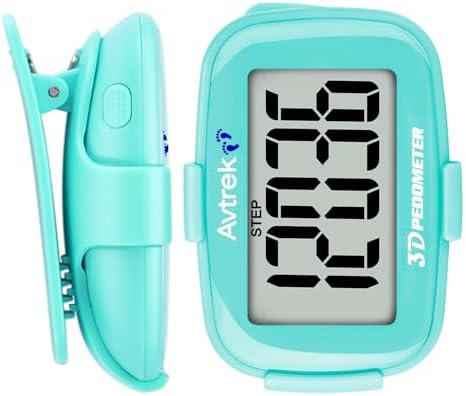
Best for: walkers who check their count in low light and want a clock on the same device.
The AVTREK adds a backlight to the plain step counter idea. For example, a retailer listing describes a screen with time and steps, an LED backlight, a 12 or 24 hour clock and no app or Bluetooth. However, it does not show calories, distance or pace.
The listing says one CR2032 battery lasts about a year, and the counter has no memory, so steps reset to zero at midnight when the time is set. Finally, a listing also describes a button sequence for a manual reset. However, reviewers on the listing note that the clip can slip off a belt, so a pocket or lanyard is safer.
- Steps and a 12/24 hour clock; no distance or calories
- LED backlight
- CR2032 battery, about 1 year per the listing
- No memory; resets at midnight
- Weighs about 30 g (1.1 oz), per the listing
Pros
- Backlight for dim light
- Clock and steps on one device
- No app or Bluetooth
- Light and small
Cons
- No step history
- Screen is small at about 0.4 to 1 in. depending on the listing, so check the photos
- Reset steps need a button sequence
Skip it if: you want a history of past days; this model forgets each day at midnight.
Best If You Want an App
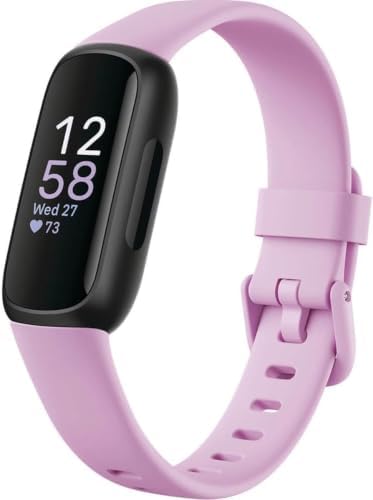
6. Fitbit Inspire 3
Best for: seniors comfortable with a smartphone, or families who want to review activity in an app.
The Fitbit Inspire 3 is a wrist band, not a clip-on pedometer, and it is the only pick here that needs a phone. Google’s spec page says you must install the Google Health app on a compatible phone to set up and use it, with iOS 16.4 or higher or Android 11.0 or higher.
In return you get an AMOLED display, a 3-axis accelerometer, an optical heart rate sensor and a battery rated up to 10 days. It is also water resistant to 50 meters, and it weighs 17.69 g (0.039 lb). However, a charger and an account are part of the deal, which is the opposite of a simple clip-on.
- AMOLED display with Gorilla Glass 3
- Battery up to 10 days; about 2 hours to charge
- Water resistant to 50 m
- 3-axis accelerometer and optical heart rate sensor
- Needs the Google Health app on iOS 16.4+ or Android 11+
Pros
- Color screen and wrist wear
- Long battery for a smart band
- Optical heart rate sensor
- Water resistant
Cons
- Phone, app and account are required
- Needs regular charging
- More features than most seniors need
Skip it if: you do not use a smartphone; pick any clip-on counter above instead.
How We Chose the Best Pedometer for Seniors
To be clear, we did not test these devices by hand. Instead, we compared listings, maker pages and one independent review, then kept devices that fit a simple brief. In addition, every figure in the reviews comes from a page we opened, and we dropped any spec we could not find.
- Readable display: a large screen that shows the count without squinting.
- No app needed: five of six picks work standalone; the one that needs a phone is labeled.
- Simple controls: few buttons, because accidental resets are a real problem.
- Published specs: memory, battery and carry options had to be stated somewhere we could read.
- Sources: we used the CDC guidance for adults 65 and older, a NIH summary of a JAMA step study and a 2019 study of older women for background.
This guide is about counting steps, not diagnosing anything. Also, a pedometer is not a medical device, so talk with your doctor before changing how much you walk, especially after a fall, surgery or a heart or joint problem.
Best Pedometer for Seniors: Clip-On, Pocket or Wrist?
First, the type matters more than the brand. For example, a clip-on pedometer counts the motion of your hip, while a wrist band counts arm swing. The table shows how the three styles differ for older walkers.
| Type | Good for | Watch out for | Examples here |
|---|---|---|---|
| Clip-on, steps only | Large numbers and no menus | Manual reset, no history | 3DFitBud, AVTREK |
| Clip-on with memory | Looking back over days or weeks | More buttons and screens | 3DTriSport, Pedusa PE-771, OZO SC2 |
| Wrist band | Wearing all day, heart rate, family sharing | Phone, app, charging | Fitbit Inspire 3 |
For other health trackers, see our best blood pressure monitor guide and our best fitness scale guide. If you want a broader view of measuring tools, start with the measuring tools guide.
Setting Up a Pedometer for Seniors: Stride, Position and Pace
Overall, most pedometer errors come from how the device is worn, not from the device itself. For instance, Omron’s manual for a similar pocket pedometer says that unit position, an uneven pace and vehicle vibration all affect accuracy, and it tells users to avoid the back pocket. Therefore, the same advice applies to the models on this page.
Where to wear it
First, clip it to a waistband or put it in a front pocket, with the display facing the way the maker shows. In addition, OZO says its SC2 can ride in a pocket, on a strap or in a bag. A neck lanyard is useful if you tend to knock buttons while bending. Meanwhile, a loose bag swinging at your side will change counts.
Stride length
In fact, distance on a pedometer is just steps times stride length. Therefore, a wrong stride setting gives a wrong distance even when the step count is right. To set it, first walk 10 steps, measure the distance in feet or meters and divide by 10. As a result, models that show distance usually ask for this number.
Slow walking and canes
In practice, many older adults walk slowly or use a cane or walker, and some pedometers miss steps at low speed. In a 2018 PLOS ONE study of an accelerometer-based watch built for older adults, the authors found low error at slow and normal speeds. They also found the error rose at fast speeds. However, that study used one specific device, so it does not prove any model here will count your steps. Test your own device instead.
How to Test Your Pedometer for Seniors in Five Minutes
A quick home test shows whether your device suits your walk. First, follow these steps. Then repeat them with the device in a second position.
- Reset the count. Clear the display or note the starting number.
- Wear it as you normally would. Use the same pocket, clip or lanyard you plan to use every day.
- Walk 50 steps at your usual pace. Count them out loud or ask a helper to count.
- Compare the numbers. Read the display, then subtract your own tally.
- Repeat twice. If counts are off by more than a few steps each time, move the device or try another carry position.
Also, take at least 20 steps before reading some models, because they wait for a run of steps before they start counting. OZO, for example, says its SC2 starts at step 16 after 15 consecutive steps.
Daily Step Goals: What the Research Says for Older Adults
A pedometer is only useful if the number means something. For adults 65 and older, the CDC recommends 150 minutes a week of moderate activity plus muscle strengthening on two or more days and balance activities. It talks in minutes, not steps, so steps are just one way to track the same habit. In addition, if you cannot meet these targets, the CDC says to be as active as your abilities and health conditions allow.
Next, research gives some reference points. In a 2019 JAMA Internal Medicine study of 16,741 women with a mean age of 72, women averaging 4,400 steps per day had a lower risk of death than women averaging 2,700. The benefit leveled off around 7,500 steps per day. Likewise, a 2020 JAMA study of about 4,800 adults aged 40 and over found lower mortality at 8,000 steps per day than at 4,000. These are observational studies, so they show association, not cause.
The practical lesson is to start from your own baseline. For example, wear the device for a week without changing anything. Then add a few hundred steps a day. In addition, our walking time guide shows how long common distances take at different paces, and the Apple Watch speed guide covers wrist-based pace. Always follow your own doctor’s advice on how much to walk.
Walking Distance Converter for Your Pedometer
Many pedometers show distance in miles, but a doctor or walking group may use kilometers. Therefore, use the converter below to switch between units for your daily walk.
Care, Batteries and Honest Limits of a Pedometer for Seniors
Meanwhile, clip-on pedometers use a CR2032 coin cell, which is easy to change but small enough to be a hazard for children and pets. Therefore, store spare batteries safely and have a helper change the cell if the door needs a screwdriver, as several of these models do.
Finally, remember what a pedometer cannot do. It estimates steps from motion, so cane use, shuffling, stairs and vehicle rides can all change counts. In addition, calories and distance are calculated estimates. It does not measure heart health, balance or fall risk, and it cannot replace medical advice.
Best Pedometer for Seniors FAQ
What is the best pedometer for seniors?
The 3DFitBud Simple Step Counter is the best pedometer for seniors who want simplicity. For example, it shows steps on an extra-large screen, works with no app and uses one reset button. If you want a month of history, choose the 3DTriSport instead.
What is the best pedometer for seniors with no app?
Any clip-on model here works without an app. In fact, the 3DFitBud, 3DTriSport, Pedusa PE-771, OZO SC2 and AVTREK all work on their own. Only the Fitbit Inspire 3 needs a phone and the Google Health app.
Where should you wear the best pedometer for seniors?
Wear it on a waistband or in a front pocket, as the maker shows. In addition, a neck lanyard works for some models. However, avoid the back pocket and loose bags, because position changes accuracy.
How accurate is the best pedometer for seniors?
Accuracy varies by device, position and walking style. For instance, OutdoorGearLab reported 90.8 percent accuracy for the OZO SC2 in its test. As a result, treat every clip-on count as an estimate and run the five-minute test.
Do pedometers work for slow walking or a cane?
Some do and some do not. Research on a watch designed for older adults found low error at slow speeds, but that was one model. Therefore, test your own device with your usual pace and aid before trusting its counts.
How many steps should a senior take per day?
There is no single number. Instead, the CDC gives its guidance in minutes: 150 minutes a week of moderate activity for adults 65 and older. Studies link roughly 4,400 to 7,500 steps per day to better outcomes in older women, but they show association only.
Is a big display important on the best pedometer for seniors?
Yes, because a readable number gets used. For example, the 3DFitBud listing describes an extra-large LCD, and the 3DTriSport lists a 1.7 in. screen. However, check the product photos, since not every maker publishes display size.
Is the best pedometer for seniors a clip-on or a fitness band?
Choose a pedometer if you want a low-cost, low-tech device with no charging. In contrast, a fitness band suits someone who likes wearing a watch, has a smartphone and wants heart rate data. The Fitbit Inspire 3 is the band pick here.
How do I set my stride length?
Walk 10 normal steps, measure the distance, and divide by 10. Enter that number if your pedometer asks for stride length. In short, a right stride gives a right distance estimate.
How long do pedometer batteries last?
The clip-on models here use a CR2032 battery, with listings giving about 12 months for the 3DFitBud, 3DTriSport and AVTREK. The Fitbit Inspire 3 lasts up to 10 days per charge. Real life varies with use.
Bottom Line on the Best Pedometer for Seniors
For most older walkers, the best pedometer for seniors is the 3DFitBud Simple Step Counter. It has an extra-large display, one button, no app and a long battery life. Choose the 3DTriSport for a month of history, the AVTREK for a backlight, or the Fitbit Inspire 3 if a phone app sounds helpful. Always check your count with the five-minute walk test.