
To get an iPhone speed reading, use one of five methods: turn on the Google Maps speedometer, run a GPS speedometer app, time a known distance with the Clock stopwatch, count frames in a slow-motion video, or check Walking Speed in the Health app. GPS methods suit driving, while video suits balls, bikes and runners.
Your phone has no built-in speedometer screen. Even so, it carries everything a speedometer needs: a satellite receiver, motion sensors, a precise clock and a camera that films up to 240 frames per second on many models. The trick is knowing which tool fits which job.
For example, a driver wants a live number on the dashboard. A coach, on the other hand, wants the speed of a pitch or a sprint. Similarly, a walker may only want to know whether their pace is changing over months. Each case calls for a different method, and each method has its own accuracy limits.
In short: use GPS for anything you ride or drive, use slow-motion video or a stopwatch for short bursts you can film or time, and use the Health app for long-term walking trends.
How good is phone GPS? The US government’s GPS program explains that real-world accuracy depends on atmospheric effects, sky blockage and receiver quality. So a phone on the dashboard with a clear view of the sky reads far better than one in a pocket inside a city canyon.
Below, you will find a converter for your readings, a method comparison, step-by-step instructions and the math behind the video method.
Convert Your iPhone Speed Reading
Apps and maps may show mph, km/h or meters per second. Type your number below and pick the unit. The converter then shows the same speed in the other units, using the exact definition 1 mph = 0.44704 m/s.
Recommended Tools for Measuring Speed
Your iPhone covers most needs on its own. However, a few accessories make the readings steadier. First, a dashboard mount keeps the phone still and gives it a clear view of the sky. Next, a tripod holds the camera steady for slow-motion clips. Finally, a dedicated radar or GPS unit helps when you need numbers for training or cycling every day.


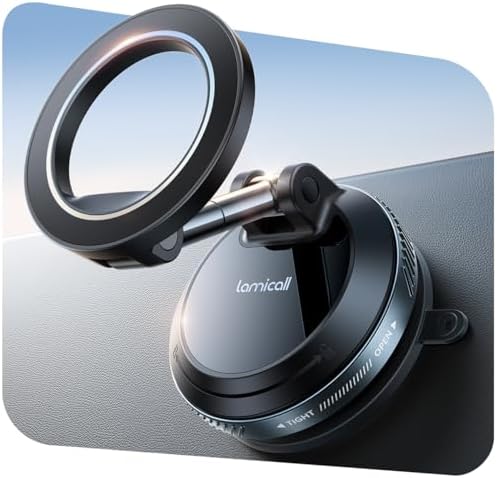
![[True Military-Grade] Car Phone Holder VANMASS [Upgraded Stronges...](https://m.media-amazon.com/images/I/512X87YSVuL._AC_.jpg)

As an Amazon Associate, Measuring Expert earns from qualifying purchases.
- The iPhone has no stock speedometer, but Google Maps added one for iOS in 2024.
- GPS speed works best outdoors with the phone mounted and a clear sky view.
- Slow-motion video turns any iPhone into a frame-counting speed gun.
- Speed equals distance divided by time; frames divided by frame rate gives the time.
- The Health app estimates walking speed when you carry the phone in a pocket.
- Apple Maps can show posted speed limits in some areas, not your own speed.
- Never handle the phone while driving; mount it and set it up first.
Five iPhone Speed Methods Compared
Each method answers a slightly different question. So start by picking the row that matches what you want to measure.
| Method | Best for | What it needs | Live reading? |
|---|---|---|---|
| Google Maps speedometer | Driving | Location access, navigation running | Yes |
| GPS speedometer app | Driving, cycling, boating | Location access, open sky | Yes |
| Slow-motion video | Balls, runners, bikes, cars passing | Known distance, steady camera | No |
| Clock stopwatch | Laps, sprints, a car over a measured stretch | Known distance, quick thumb | No |
| Health app Walking Speed | Long-term walking trends | Phone in a pocket, height entered | No |
The older advice to “turn on a speed option in Apple Maps” needs a correction. Apple Maps can display the posted speed limit during navigation in supported areas. It does not, however, show how fast you are going. For that, you need Google Maps, a third-party app or one of the manual methods.
How to Turn On the iPhone Speed Display in Google Maps
Google brought its speedometer and speed limit display to iPhone and CarPlay in July 2024, about five years after Android. Here is how to switch it on before you drive.
- Update Google Maps. Install the latest version from the App Store so the driving options appear.
- Allow location access. In the iPhone Settings app, set Google Maps location access to While Using the App and turn on Precise Location.
- Open the driving options. In Google Maps, tap your profile picture, then Settings, Navigation and Driving options.
- Switch on Speedometer. Also turn on Speed limits if you want the posted limit next to your speed.
- Mount the phone. Place it where it sees the sky through the windshield and where you can glance at it safely.
- Start navigation. Enter a destination and start driving; the speed then appears in a corner of the map.
How GPS Measures Your iPhone Speed
A GPS receiver does more than mark a dot on a map. It also compares positions over time, and many receivers use the Doppler shift of satellite signals to estimate velocity directly. As a result, speed readings often stay steadier than the position itself.
Speedometer apps simply read this value from iOS and display it in large numbers. Some add a trip log, a heads-up mode that mirrors the screen onto the windshield, or alerts at a chosen speed. Because they all rely on the same chip, the main difference between apps lies in the display, not the accuracy.
GPS struggles in three places: tunnels, parking garages and streets lined with tall buildings. In those spots the signal bounces or disappears, so the reading may freeze, jump or drop to zero.
Slow-Motion Video: An iPhone Speed Gun for Balls and Runners
For anything fast and short, the camera beats GPS. The idea is simple. First, film the object as it crosses two marks a known distance apart. Then count the frames between the marks. Since slow motion records a fixed number of frames per second, frames divided by the frame rate gives the time.
The formula: speed = distance / (frames / frame rate).
| Example | Distance | Frames at 240 fps | Time | Speed |
|---|---|---|---|---|
| Sprinter | 10 m (32.8 ft) | 312 | 1.30 s | 7.69 m/s = 17.2 mph = 27.7 km/h |
| Cyclist | 15 m (49.2 ft) | 576 | 2.40 s | 6.25 m/s = 14.0 mph = 22.5 km/h |
To set it up, place two cones or tape marks, measure the gap with a tape measure, and stand the phone on a tripod level with the marks and far enough back to see both. Next, choose Slo-mo in the Camera app; you can pick 120 or 240 fps in the camera settings on most recent models. Finally, scrub through the clip in Photos and note the frame where the object reaches each mark.
The Stopwatch Method for Laps and Measured Stretches
No slow-motion clip? Then the Clock app’s stopwatch still works for longer distances. Start the watch as the runner, bike or car passes the first mark, and stop it at the second. After that, divide distance by time.
For instance, a car that covers a quarter mile (402.3 m) in exactly 60 seconds travels 6.71 m/s, which is 15 mph or 24.1 km/h. Likewise, a runner who finishes a 400 m track lap in 100 seconds averages 4 m/s, or about 8.9 mph.
Human reaction time adds error at both ends. Therefore, use long distances, where a tenth of a second matters less. Over a 10-second run, a 0.2-second timing error changes the speed by about 2 percent. Over a 1-second dash, the same error changes it by about 20 percent. Curious how fast people really run? Our page on how fast a human can run gives real benchmarks.
Walking Speed in the iPhone Health App
Since iOS 14, iPhone 8 and later models estimate walking speed in the background. According to Apple’s own mobility metrics paper, the estimate is most accurate when the phone sits close to the body, such as in a pocket or on a belt. It also requires an up-to-date height in the Health app.
To see it, open Health, tap Browse, then Mobility, then Walking Speed. The app only logs flat, steady walking. It skips running and steep hikes, so do not expect a number for every outing. In Apple’s validation work, the error had a standard deviation of about 0.15 m/s, or roughly 0.34 mph.
Running speed and pace are a different story. The iPhone Fitness app shows steps and distance, but detailed running pace normally comes from an Apple Watch workout or a running app that uses GPS.
iPhone Speed Accuracy Compared With Other Tools
People often treat any number on a screen as exact. In practice, each tool measures speed in a different way, and therefore each one fails in a different way.
| Tool | How it measures | Typical weak spot |
|---|---|---|
| Car speedometer | Wheel or transmission rotation | Usually reads a little high; tire size changes it |
| iPhone GPS | Satellite positions and Doppler shift | Lag at quick changes; fails in tunnels and garages |
| Slow-motion video | Distance and frame count | Camera angle and frame-picking errors |
| Radar gun | Doppler shift of a radio signal | Must aim along the path; cost |
| Health app | Motion sensors and a body model | Walking only; needs phone in a pocket |
So if your GPS reading and your dashboard disagree by a mile or two per hour, neither is broken. The GPS figure is usually the closer one at a steady speed on an open road.
Do and Don’t
Do
- Mount the phone with a clear view of the sky.
- Turn on Precise Location for speed apps.
- Measure your distance marks with a tape.
- Film slow-motion clips square to the path.
- Average several runs before you trust a figure.
Don’t
- Handle the phone while driving.
- Trust GPS speed in tunnels or garages.
- Film at a sharp angle to the motion.
- Time very short sprints by thumb alone.
- Use a phone reading to argue a speeding ticket.
Honest Limits of iPhone Speed Tools
A phone is a clever general-purpose tool, but it is not a calibrated instrument. GPS speed lags behind sudden braking or acceleration, so peak and stop readings are rough. Moreover, third-party apps vary in how much they smooth the data, which can hide short spikes. Video math depends entirely on the distance you measured and the frames you picked; one frame at 240 fps is about 0.004 seconds, which matters only for very short clips. Finally, the Health app gives trends, not lap-by-lap figures. In short, treat phone readings as good estimates for training and curiosity, not as evidence.
When to Use a Professional Tool
Some situations need certified equipment. For example, a speeding ticket dispute calls for an attorney and the calibration records of the police device, not an app screenshot. Similarly, if your car’s speedometer seems far off after new tires or a lift kit, a repair shop can test and recalibrate it. Coaches who track velocity for scholarships or scouting usually use a dedicated radar unit, and labs use light gates or high-speed cameras with known timing.
Frequently Asked Questions
Does the iPhone have a built-in speedometer?
No. iOS has no stock speedometer screen. However, Google Maps for iPhone can show your speed, and many App Store apps read the GPS speed and display it.
How accurate is iPhone speed from GPS?
At a steady speed outdoors with a clear sky view, GPS speed is usually close to the true value. It becomes unreliable in tunnels, garages, dense cities and during sudden speed changes.
Can Apple Maps show my speed?
Apple Maps can show the posted speed limit during navigation in supported areas, but it does not show how fast you are going. Use Google Maps or a speedometer app for that.
How do I measure the speed of a ball with my iPhone?
Mark two points a known distance apart, film the ball in slow motion from the side, count the frames between the marks, and divide the distance by frames divided by the frame rate.
What frame rate should I use for iPhone speed videos?
Use 240 fps when your model offers it, because more frames per second mean smaller timing steps. At 240 fps, one frame lasts about 0.004 seconds.
Can my iPhone measure my walking speed?
Yes. On iOS 14 and later, the Health app estimates Walking Speed under Mobility when you carry the phone close to your body and have your height entered.
Can my iPhone measure my running speed?
Running apps that use GPS can show pace and speed during a run. The Health app’s Walking Speed skips running, and detailed running metrics usually come from an Apple Watch.
Why does my iPhone speed differ from my car’s speedometer?
Car speedometers usually read slightly high and change with tire size, while GPS measures movement over the ground. A gap of one or two mph at highway speed is normal.
Do iPhone speedometer apps work without cell service?
Yes. GPS reception does not need a cell signal. Maps may not load without data, but the speed reading itself comes from satellites.
Can I use an iPhone speed reading to fight a ticket?
It is unlikely to help. Phone apps are not calibrated instruments, so talk to a traffic attorney about the evidence that actually counts in your state.
The Bottom Line on iPhone Speed
An iPhone can measure speed in more ways than most owners realize. For driving and cycling, mount the phone and use the Google Maps speedometer or a GPS app. For a pitch, a sprint or a passing bike, slow-motion video with two measured marks gives a surprisingly good answer, and the stopwatch works for longer stretches.
Above all, match the tool to the job and remember its limits. Then use the converter at the top of this page to switch your number between mph, km/h, m/s and knots. For distance references on city streets, our guide to how long a city block is also comes in handy.
2 thoughts on “How to Use an iPhone to Measure Speed: 5 Methods That Work”